After burning out twice in my first three years of freelancing, I finally figured out what was killing my productivity: constant context switching. Client emails, Slack messages, scope creep—everything bled together. Time blocking for freelancers isn’t just a nice-to-have system. It’s the difference between sustainable growth and eventual collapse.
Here’s the framework I’ve used for the past two years to protect four hours of deep work every single day, even with demanding clients across multiple time zones.
In this guide, I’ll break down exactly how time blocking for freelancers works in practice: the deep work window, the themed blocks for the rest of the day, and the rules that keep the system from collapsing when clients push back.
Why Traditional Time Management Fails Freelancers
Most time management advice assumes you control your schedule. As a freelancer, you don’t. Clients expect immediate responses. Projects have tight deadlines. Emergency requests arrive at 4 PM on Friday.
The problem isn’t discipline. It’s that freelancers operate in two fundamentally different work modes: deep work (strategic, creative tasks requiring sustained focus) and shallow work (emails, calls, admin tasks). Mixing these modes destroys productivity.
Calendar management becomes critical when you realize that your earning potential depends on protecting time for high-value work. One hour of focused deep work produces more billable value than four hours of fragmented attention.
That is the core promise of time blocking for freelancers: you decide when high-value work happens before your inbox decides for you.
The 4-Hour Deep Work Block: My Core System
Every morning, 6 AM to 10 AM is sacred. No meetings, no email, no Slack. This is when I handle:
- Client strategy work and high-level deliverables
- Content creation and creative problem-solving
- Complex technical tasks requiring sustained concentration
- Business development and proposal writing
I chose morning because clients rarely expect responses before 10 AM. By protecting these hours, I complete my most valuable work before the reactive part of my day begins.
This focus time is non-negotiable. When clients request morning meetings, I offer afternoon slots. In three years, exactly two clients pushed back—and both accepted alternative times when I explained my productivity system benefits them through better work quality.
This is the single habit that made time blocking for freelancers stick for me. Everything else in the system exists to protect these four hours.
Setting Up Your Deep Work Window
Your deep work block doesn’t need to be morning. Night owls might prefer 9 PM to 1 AM. The key variables are:
- When is your energy highest?
- When do clients least expect immediate responses?
- Can you protect this time consistently?
Consistency matters more than duration. Two protected hours daily beats four inconsistent hours weekly. Your brain adapts to routine, making it easier to enter deep work when your scheduled block arrives.
Time Blocking Structure for the Rest of Your Day
Outside my deep work block, I use themed time blocks rather than task-specific scheduling. This approach, central to any effective productivity system, provides structure while maintaining flexibility for client needs.
Themed blocks are what make time blocking for freelancers realistic. You don’t need to predict every task, only which type of work belongs in each part of the day.
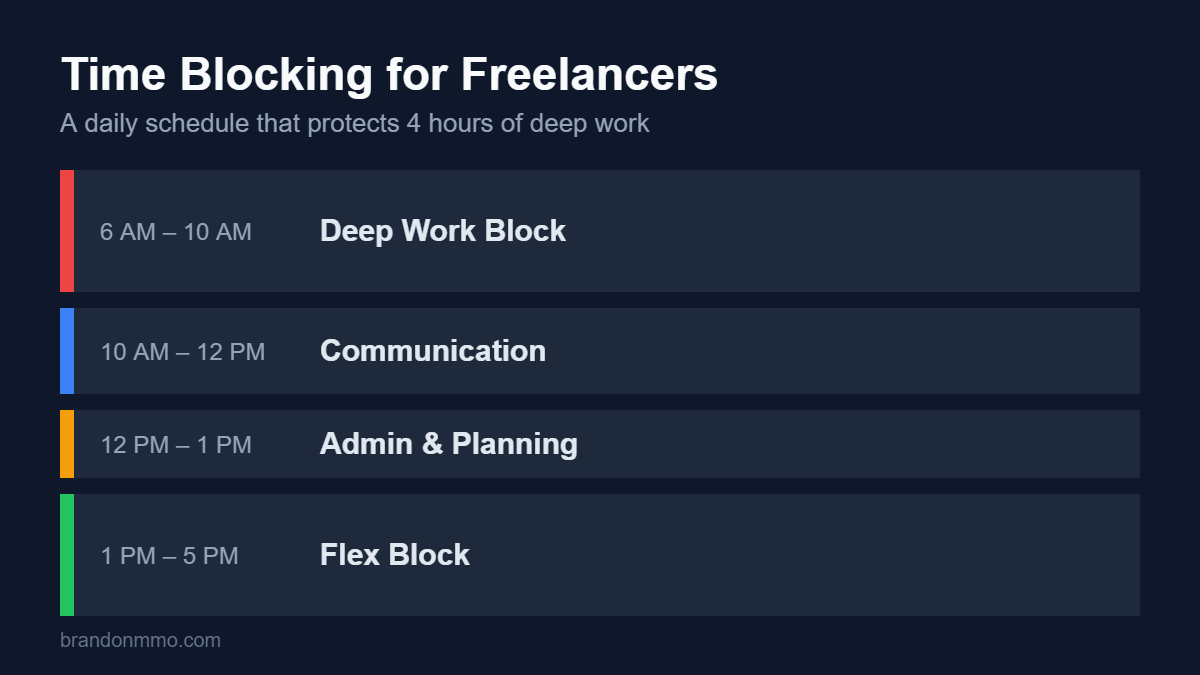
10 AM – 12 PM: Communication Block
This window handles all email, Slack, and client communication. I batch responses rather than reacting throughout the day. Clients receive thorough, considered replies instead of rushed messages.
I schedule all regular client calls during this window. When managing multiple projects simultaneously, this centralized communication time prevents context switching from destroying afternoon productivity.
12 PM – 1 PM: Admin & Planning
Invoicing, expense tracking, calendar management, and project planning happen here. This connects directly to my Weekly Review System, where I assess whether my time blocking actually aligned with priorities.
1 PM – 5 PM: Flex Block
This time adapts based on workload. Some days it’s additional deep work. Other days it’s client meetings, research, or overflow from morning work. The key is intentional allocation, not reactive scrambling.
For complex deliverables, particularly when Managing Complex Projects, I often extend deep work into early afternoon. The morning block ensures baseline progress even if afternoon plans change.
The Rules That Make Time Blocking Actually Work
Systems fail without boundaries. These rules transformed time blocking for freelancers from theory to sustainable practice:
Rule 1: Block Time the Week Before
Every Friday, I block time for the following week. This prevents reactive scheduling where client requests automatically fill your calendar. When someone requests a meeting, I already know which slots are available.
Rule 2: Communicate Your System
I tell new clients upfront: “I protect morning hours for deep work to deliver my best results. I’m available for meetings after 10 AM and respond to messages by noon daily.” Setting expectations prevents conflicts.
Rule 3: Physical Boundaries During Deep Work
During my focus time: phone on airplane mode, email closed, Slack closed, door closed. Half-measures don’t work. Your environment must support your calendar management decisions.
Rule 4: Track and Adjust Weekly
I track actual time use versus planned blocks. When reality diverges from plans repeatedly, I adjust the system rather than blame myself. Sustainable productivity requires honest assessment.
Weekly reviews are where time blocking for freelancers gets sharper over time, because every adjustment is based on real data instead of guesses.
Handling Urgent Client Requests
The biggest objection to time blocking for freelancers: “What about emergencies?” Here’s the truth—very few things are genuinely urgent.
I define emergency as: client’s business faces immediate financial loss or reputational damage without instant response. Maybe twice per year, something meets this threshold.
For everything else: “I’m in a deep work block until 10 AM. If this is urgent, call me—otherwise I’ll respond within two hours.” Clients respect boundaries when you’re consistent and reliable within your stated response times.
Handled this way, time blocking for freelancers doesn’t make you less responsive. It makes your responses more deliberate.
Tools That Support Time Blocking for Freelancers
You don’t need fancy software, but these tools make calendar management easier:
- Google Calendar color coding: Red for deep work, blue for meetings, green for flex time—visual clarity helps maintain boundaries
- Calendly with buffer times: Prevents back-to-back meetings that eliminate transition time
- Freedom or Cold Turkey: App blockers that enforce focus time boundaries
- Time tracking software: RescueTime or Toggl reveals where time actually goes versus where you planned
The best productivity system is the one you’ll actually use. Start simple: protected morning block, batched communication, weekly planning. Add complexity only when basics become automatic.
If you’re just starting with time blocking for freelancers, begin with Google Calendar alone and add tools only when a specific problem shows up.
Adjusting Time Blocking for Different Project Phases
Time blocking for freelancers isn’t rigid. Project phases require different allocations:
Discovery and strategy phases: Expand deep work blocks to 5-6 hours. These phases demand sustained thinking and research.
Execution phases: Standard 4-hour deep work block handles most implementation work while maintaining communication.
Revision and delivery phases: Shift to shorter deep work blocks (2-3 hours) with more communication time for feedback loops.
The underlying structure remains constant. Only the proportions change based on what the work requires.
That flexibility is what keeps time blocking for freelancers sustainable across very different client projects.
Measuring Success: What Actually Matters
After two years of consistent time blocking, I measure success by:
- Revenue per focused hour (up 180% from pre-system baseline)
- Deep work blocks protected per week (target: 20 hours, typically hit 18-22)
- Client satisfaction scores (improved despite slower response times)
- Personal sustainability (zero burnout incidents since implementing system)
Time blocking for freelancers succeeds when it increases both output quality and personal well-being. Any system that sacrifices one for the other eventually fails.
Start Tomorrow: Your First Week Implementation
Don’t overhaul everything at once. For your first week:
- Protect two hours tomorrow morning. Just two. No meetings, no email.
- Identify your most valuable deep work task and complete it during those two hours.
- Batch all email responses into one afternoon session.
- Note how much you accomplished versus typical fragmented days.
- Gradually extend to four hours as the routine solidifies.
The freelancers who build sustainable practices don’t have more discipline than you. They have systems that make the right choices automatic. Time blocking creates structure that protects your most valuable asset—sustained attention on work that actually matters.
Time blocking for freelancers works because it turns good intentions into calendar commitments that clients can see and respect.
Your calendar reflects your priorities. Make sure it’s protecting what drives your business forward, not just reacting to whoever shouts loudest.